How to block calls by area code or country code on Android
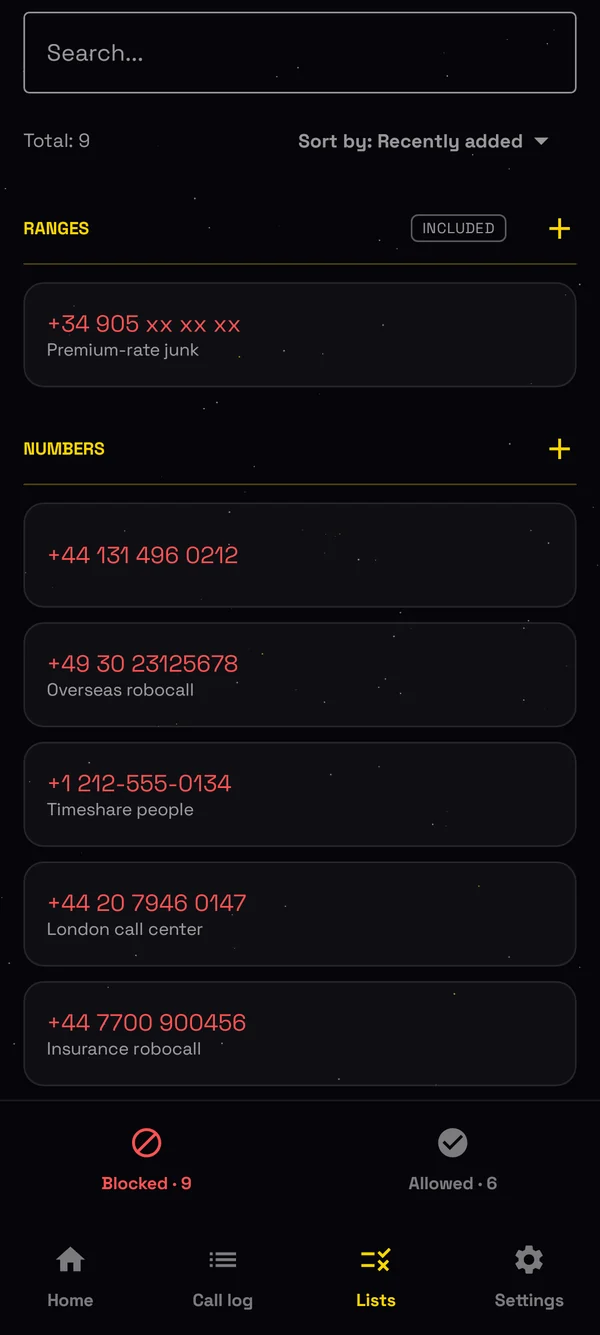
Spam often comes from many numbers that start the same way. Blocking them one by one never ends. A range blocks every number that starts the same way, in one entry.
What a range blocks
- +44 blocks every number from the United Kingdom.
- +1 212 blocks one New York area code.
- +34 905 blocks premium-rate numbers in Spain.
How to block an area code
- Install Bouncer from Google Play, and make it your spam blocking app in setup.
- Open Lists, and tap + next to Ranges.
- Type the start of the number, like +1 212. Bouncer shows the rest of the number as you type.
- Save. Every number that starts that way stops ringing.
Ranges are part of Bouncer Pro.
Let Bouncer find the ranges for you
When 3 numbers from the same range call you, Bouncer suggests blocking the whole range, on Lists and in Blocking suggestions. One tap blocks it, and you can undo it.
Ranges your country already reserves
Some countries make telemarketers use their own numbers, so one range stops all their sales calls. Read how it works in Spain, and in India, Brazil, Chile and France.
Block numbers or ranges, or block everyone except your contacts.

From 17 October, sales calls in Spain come from numbers that start with 400. Here is how to block them.
Read → October 2026 How to block telemarketing calls in India, Brazil, Chile and France140 in India, 0303 in Brazil, 809 in Chile, and the automated call ranges in France. Block them in one tap.
Read → October 2026 Bouncer call blocker now speaks 11 languagesEnglish, Spanish, Portuguese, French, German, Italian, Turkish, Polish, Russian, Croatian and Serbian.
Read → September 2026 How to block unknown calls at night, and only at nightOvernight, in working hours or at the weekend: choose when unknown numbers stop ringing.
Read → June 2026 How to block calls from numbers not in your contacts on AndroidOnly the people you know get to ring. Here is how to block every other number in 30 seconds.
Read →