How to block unknown calls at night, and only at night
Maybe a call from an unknown number is fine at 2 in the afternoon, but not at 2 in the morning. Blocking hours let you choose when Bouncer blocks.
Why not use Do Not Disturb?
Do Not Disturb works on your whole phone: notifications, messages and calls. Blocking hours only touch calls from numbers you do not know. Messages still arrive, and your contacts still ring.
Choose when blocking is on
- Always: block 24/7.
- Overnight: 10 PM to 7 AM, or your own times.
- Working hours: weekdays, 9 AM to 5 PM unless you change it.
- Weekend: Friday 10 PM to Monday 7 AM, or your own times.
Turn on as many as you like. Outside those times, unknown numbers ring as normal.
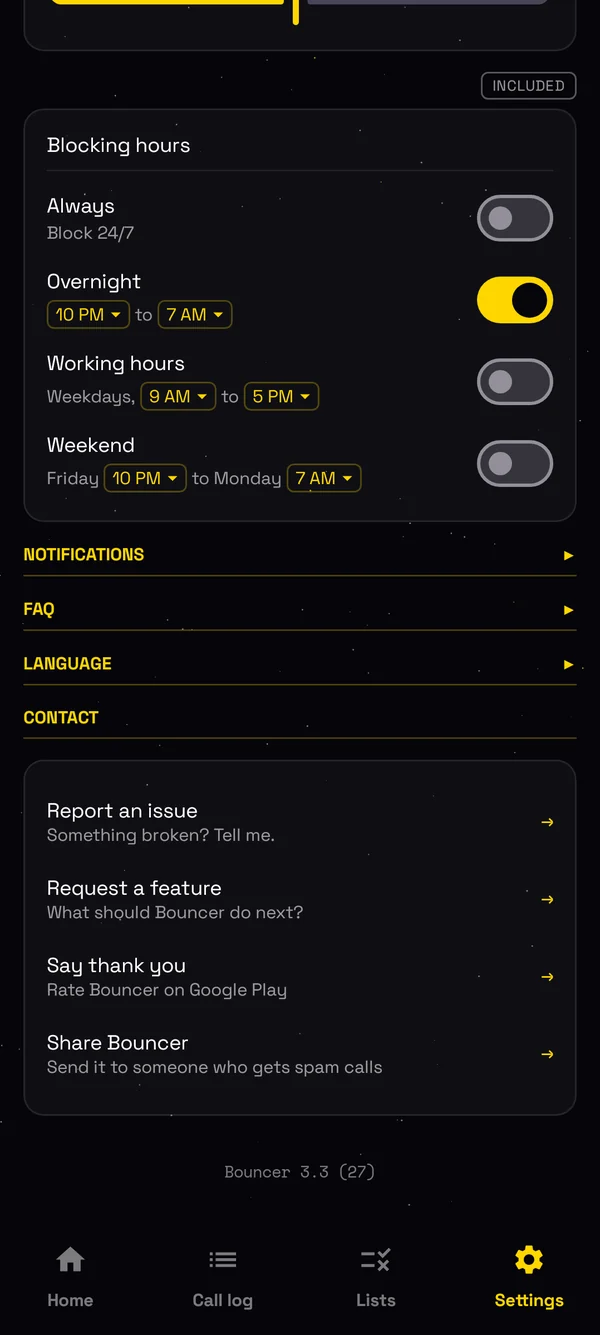
How to set blocking hours
- Install Bouncer from Google Play, and make it your spam blocking app in setup.
- Open Settings, and find Blocking hours.
- Turn on Overnight, Working hours or Weekend. Tap a time to change it.
Blocking hours are part of Bouncer Pro.
What if someone really needs me at night?
Your contacts always ring, and so does anyone on your allow list. With Pro, a number that calls 3 times within 30 minutes gets through too, because that might be an emergency. You can change both numbers.
Block numbers or ranges, or block everyone except your contacts.

From 17 October, sales calls in Spain come from numbers that start with 400. Here is how to block them.
Read → October 2026 How to block telemarketing calls in India, Brazil, Chile and France140 in India, 0303 in Brazil, 809 in Chile, and the automated call ranges in France. Block them in one tap.
Read → October 2026 Bouncer call blocker now speaks 11 languagesEnglish, Spanish, Portuguese, French, German, Italian, Turkish, Polish, Russian, Croatian and Serbian.
Read → September 2026 How to block calls by area code or country code on AndroidBlock a whole area code, country code or prefix in one entry, and let Bouncer spot spam ranges for you.
Read → June 2026 How to block calls from numbers not in your contacts on AndroidOnly the people you know get to ring. Here is how to block every other number in 30 seconds.
Read →